A bilingual AI video for a Miami Lakes law firm, for $11.52
An attorney in Miami Lakes wanted short legal tips on social media without filming every one. She wrote a script, five steps to take after a car accident, and we turned it into a 66-second video in English and a 77-second one in Spanish: her AI face, her cloned voice, a scene for every step, titles and captions. The whole video cost $11.52 to make. Here’s what we delivered, where every cent went, and how we did it.
A civil litigation attorney in Miami Lakes, Florida.
The ask
Short legal tips in English and Spanish, with her face and her voice, without filming each one.
What we built
Her AI twin from her own photos and voice, two finished videos, and a private studio she owns to make more.
The result
66 s in English and 77 s in Spanish, in two days, for $11.52. She approves every post.
What we learned
Most of the money is the moving scenes. $8.67 of the $11.52 went to Google’s video model. Her talking parts cost $2.00 for both languages, because HeyGen only animated the lines where she’s on camera.
Her words, her face, her voice. The script is hers. The face comes from her own photos, the voice from her own recording, and she approves every video before it’s posted.
Claude Code does the work. It writes the voiceover, the shot plan, the scene pictures, the edit and the captions. You read, listen, and say what to change.
Prices change. Each one below links to the page it came from, checked November 18, 2026.
The video Five steps after a car accident, in two languages
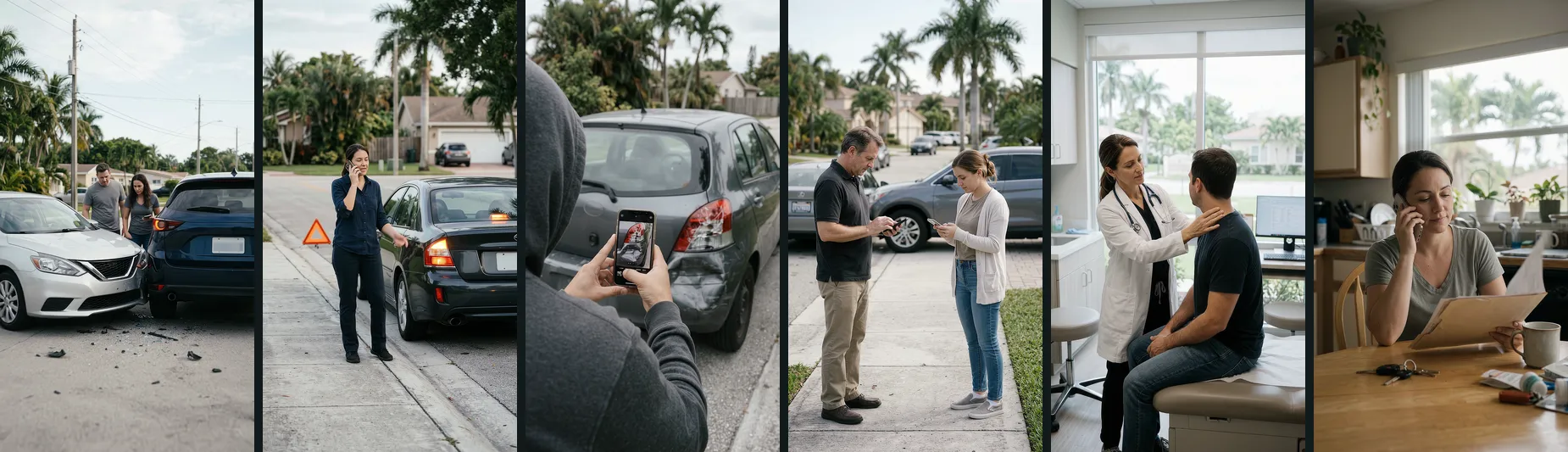
She’s on camera for about a third of it: the opening, a few returns, and the ending. Every other line plays over a scene that shows what she’s saying. Here are the scenes.
The scenes, in the order they play. None of these people are real.
What’s on screen
Her on camera
Five short clips of her AI twin at her desk, lip-synced to her cloned voice.
Moving scenes
The crash, the call for help, the photos, the witness, the doctor, the insurance call. Every person in them is AI-made.
Step titles
“1 Safety first” through “5 Notify your insurer”, at the top of the screen.
Captions
Her firm’s serif font and colors, three words at a time, the spoken word in rose.
A 14-day card
Florida’s deadline for first medical treatment to qualify for PIP, as a big number.
Labels
“AI-generated” the whole time, “Dramatization” on every scene, and an end card with her name and office city.
What it cost $11.52 for both languages, and where it went
These are real charges from this one video: HeyGen’s usage log, and Google’s token counts at its list price. The scenes are shared by both languages, so Spanish only adds the voice and her talking parts.
Part
What we made
Price (source)
This video
Moving scenes
9 clips, 57 s of 1080p footage
Google Gemini Omni 1.1 Flash, $17.50 per 1M video tokens, about $0.15/s at 1080p (Google)
HeyGen text to speech, $15 per 1M characters, half price through Nov 30 (HeyGen); we were charged $0.15 a track
$0.30
Edit, captions, cards
Cuts, titles, captions, labels, end card
Python and ffmpeg on the Mac
$0
Total, English and Spanish
$11.52
English only
About $10.20. Spanish adds about $1.30: one more voice track and five more short clips.
Same video on Omni 1.2
About $8.80. Google’s newer gemini-omni-1.2-flash is about $0.104/s at 1080p (and about $0.07/s at 720p). From December 3, calls to 1.1 go to 1.2 anyway.
One time
Her photo avatar look: $1.32 at HeyGen. The voice clone showed no charge in our usage log, and HeyGen’s API price page lists none.
Every month
Claude Pro: $20, or $17 a month paid yearly (Claude). HeyGen and Google have no monthly fee: you add funds and they bill per use.
Four videos a month
Claude Pro plus four videos like this one in both languages comes to about $55 to $66 a month, depending on which Google video model you use.
Or do it yourself
Paste one request and Claude walks you through the rest.
Install Claude Code once.
Open Terminal on a Mac, or PowerShell on Windows, paste the line for your computer, then type claude and log in with your Claude Pro or Max plan.
Mac
curl -fsSL https://claude.ai/install.sh | bash
Windows (PowerShell)
irm https://claude.ai/install.ps1 | iex
Paste one request.
Copy this into Claude Code. It installs a free skill that sets up HeyGen and Google with you, builds your AI twin, and makes your first video, one step at a time, asking before anything that costs money.
Install this skill in ~/.claude/skills/ai-video-studio: https://massonit.com/ai-video/ai-video-studio/SKILL.md. Then use ai-video-studio to set up my AI video studio with me, one step at a time. Tell me the cost before anything that charges money, and ask before you change anything.
Never paste an API key in the chatNever paste a HeyGen or Google API key into the chat. You copy the key on the Mac and Claude saves it to your Keychain without seeing it.
Then make videos from your phone.
Send a script from the Claude app, approve the costs, and get the finished video back to watch before you post it.
Only have your phone right now? In the Claude app, ask: “Read massonit.com/ai-attorney-video and help me get Claude Code on my computer, step by step.”
How it works Eight steps from script to finished video
Claude Code runs on your computer. It calls HeyGen and Google over their APIs, keeps every file in one folder, and edits the video with ffmpeg. You approve the script, the costs and the final cut.
The script
Hers, word for word. Claude translates it to Spanish and she approves the translation before anything is made.
The voiceover
HeyGen reads the whole script in her cloned voice and returns the timing of every word. That one clock lines up everything else.
The shot plan
Every line gets a picture: her on camera for the opening and a few returns, a scene for each step. Cuts land between words.
Scene pictures
Google makes one vertical picture per scene, with no text in it, so English and Spanish share them.
Make them move
Google’s video model turns each picture into a 5 to 8 second clip, starting from that exact picture.
Her talking parts
HeyGen lip-syncs her photo avatar to only the lines where she’s on camera: 22 seconds in English instead of 66.
The edit
Claude cuts it together and adds the step titles, captions, the AI label, the dramatization tag and the end card.
She approves
She watches both versions, listens to her voice, and says yes before anything is posted.
The one rule
Only your own face and your own voice. The twin is made from your photos and your recording, with your permission written down, and you approve every video that uses it.
The toolkit Four tools, all driven by Claude Code
You need accounts at three companies and two free programs. Claude installs the programs and walks you through the accounts.
Claude Code
Does the work
Start here
What it does
Anthropic’s agent that runs in a terminal on your computer. It calls the other services, writes the small scripts, edits the video and shows you the result. With Remote Control you drive it from the Claude app on your phone.
Set it up
curl -fsSL https://claude.ai/install.sh | bash
claude
Good to know
Included in Claude Pro ($20 a month) and Max. The free plan doesn’t include it.
HeyGen
Your face and voice
Pay as you go
What it does
Turns one photo of you into a talking avatar, clones your voice from a recording, reads scripts in that voice, and lip-syncs the avatar to it. Claude uses its command-line tool.
Set it up
curl -fsSL https://static.heygen.ai/cli/install.sh | bash
heygen user me get
Good to know
Add funds and make an API key on platform.heygen.com. Auto top-up is optional; we refill $15 when the balance drops under $5.
Google Gemini API
Scenes and motion
Pay as you go
What it does
Nano Banana 2.1 makes the scene pictures and your front-facing office picture. Gemini Omni Flash turns each picture into a short moving clip.
Set it up
# key from aistudio.google.com/apikey
# billing on in Google AI Studio
Good to know
Neither model has a free tier, so turn on billing. Omni refused every scene with a police officer in it; plan around it.
ffmpeg and Python
The edit
Free
What it does
ffmpeg cuts and encodes video. Python with the Pillow library draws the captions, step titles and cards in your own fonts.
Set it up
brew install ffmpeg
python3 -m pip install pillow
Good to know
Your brand fonts come from your website or designer. Claude reads your site’s colors and fonts so the captions match.
Your AI twin Set up your face and voice once
This is the part you do once. After it, every video starts from a script.
Accounts and keys.
Claude Pro for Claude Code, HeyGen with funds added and an API key (https://platform.heygen.com/api-keys), and a Google AI Studio API key with billing on (https://aistudio.google.com/apikey). You make the accounts and keys yourself; Claude saves the keys.
Never paste an API key in the chatCopy each key on the Mac and let save-key move it into your Keychain. Never paste it in the chat.
Send five to ten real photos.
Professional headshots work best: your real hair, your real face, good light. Claude uses them to make a front-facing picture of you at your own desk with Google, in two or three versions, and you pick one.
Start from your real photos.
We learned this one the hard way. Erasing glasses from a video frame makes the AI invent your eyes, and it didn’t look like her. Starting from her own photos without glasses did.
Make the photo avatar.
HeyGen turns the picture you picked into a look it can animate. $1.32, once. You can add more looks later, like a different outfit or room.
Clone your voice.
One to two minutes of you talking in a quiet room, sent as the original file. WhatsApp and text messages squeeze the sound, so use AirDrop or Google Drive. HeyGen makes an instant clone from it.
Test it.
Claude makes a 10-second test video, about $0.40. You check that it looks and sounds like you before any real video.
Want a closer match?
Record 60 to 90 seconds looking straight into the phone at eye level, at your desk. HeyGen can make a custom video avatar from it ($2.13 once, then $0.0805 a second instead of $0.0385). It moves more like you, because it learned from you moving.
Make a video What you do for each new video
Once the twin exists, a video is a script and three approvals. Claude tells you the cost before each step that charges money.
Send the script.
Paste it in, or send it from your phone. Say which languages. Claude sends back the Spanish translation for you to approve.
Approve the plan and the cost.
Claude lists every shot, which lines you say on camera, what each scene shows, and the total, about $9 to $12.
Check the scenes.
You see the scene pictures on one sheet before they’re turned into video. Swap any you don’t like for $0.05 each.
Watch the cut.
Claude sends both versions. Listen to the voice, check the lips, read every caption.
Approve and post.
Only you post it. Change one word and Claude redoes just the clip that word is in.
Florida Bar What we checked for a Florida attorney ad
A video like this is a lawyer advertisement under the Florida Bar’s rules, on social media too. This is what we built in. It’s research, not legal advice: confirm with the Bar’s ethics hotline, 800-235-8619.
Her name and office city
Rule 4-7.12 asks for a responsible lawyer or firm and the city of a real office, in every language the ad uses. The end card has both, in English and in Spanish.
“Dramatization” on every scene
Rule 4-7.13 calls out re-created events a viewer could take as real, and a car accident is the comment’s own example.
“AI-generated” the whole time
So nobody takes the twin for a recording of her. Spanish says “Generado con IA”.
Nothing manipulative
Rule 4-7.15: no injuries, no crying, no officer endorsing her. The officer scenes were cut anyway.
File it if it needs filing
The Bar’s 2026 coversheet lists Instagram, TikTok, Facebook and YouTube ads as filing media. Check whether yours must be filed before it runs.
She approves every post
She’s responsible for the ad, so nothing goes out without her yes.
The same 57 seconds of scenes cost about $5.93 instead of $8.67. At 720p it’s about $4.
Animate only what’s on camera
HeyGen bills per second of her on screen. Lip-syncing only her lines cut that part by two thirds.
Share the scenes
No text inside the pictures, so English and Spanish use the same clips. The second language costs about $1.30.
Check pictures before motion
A picture costs $0.05 and a moving clip about $0.60 to $1.20. Fix the picture first.
Try HeyGen Video 1
HeyGen’s own image-to-video lists $0.04/s at 1080p, half price through November 30. We haven’t tried it for this yet.
Free skill A skill that sets it up and makes the videos with you
A skill is a file of instructions Claude follows for a job. This one installs studio.py, the same script that made this video, then sets up the accounts with you, builds your twin, and makes each video exactly the way we made this one, telling you the cost before anything that charges money.
What it does
Installs ffmpeg, Pillow, the HeyGen tool and our studio script, asking first.
Walks you through the HeyGen and Google accounts and saves your keys with save-key.
Builds your front-facing picture, photo avatar and voice clone, and makes a 10-second test.
Turns a script into a finished video in one or two languages, with your fonts and colors.
Gives you the cost before each paid step and a receipt at the end.
Keeps the AI label, the dramatization tag and your end card on every video.
Install it
Paste this in Terminal, or just paste the request from the box at the top into Claude Code.
Change the details and send. Each one asks before it spends.
A new video
Make my next video from this script, in English and Spanish. Show me the Spanish, the shot plan and the cost before you make anything.
Price it first
How much would a 60-second video from this script cost in English only? Don’t make anything yet.
Fix one word
In the Spanish version, change “reclamo” to “reclamación” and redo only the part where I say it.
Swap a scene
Replace the insurance-call scene with someone reading a letter at a kitchen table. Show me the picture first.
A receipt
List what this month’s videos cost, by service, with the HeyGen usage log and Google’s token counts.
Words Quick definitions
AI twin
An AI version of your face and voice that can say any script.
Photo avatar
A HeyGen look made from one picture of you. It moves its head and hands and lip-syncs.
Voice clone
A copy of your voice, made from a recording, that reads any text.
Lip-sync
Moving the avatar’s mouth to match the audio.
B-roll
The scenes that play while you keep talking off screen.
API key
A password that lets Claude Code use your HeyGen or Google account. It lives in your Keychain.
Pay as you go
You add funds, and each video takes what it uses. No monthly fee.
Skill
A file of instructions Claude Code follows for one kind of job.
Work with us
Want videos like this for your firm?
We build your AI twin from your own photos and voice, make the videos with you, and hand you a studio you own, so you can make more on your own. Tell me what you do and what you want to explain.