Research · OCR for financial documents
Which OCR can you trust to check the numbers?
When an AI reads a loan file, an invoice or a financial statement, every number it pulls out needs proof that it’s really on the page. We built a checker for that, then tried to fool it: 3,714 wrong numbers planted in clean scans, faxes, phone photos and real handwriting, read by four OCR engines. Here’s what we found.
- Wrong numbers planted
- 3,714
- per engine, same pages
- Wrong numbers confirmed
- 0
- by any of the four
- Engines tested
- 4
- two free, two built in or paid
- Weak spots found and fixed
- 9
- in our own checker
The short answer
- The rules matter more than the engine. With the right checks, all four engines confirmed zero wrong numbers. A better engine only means less checking for people.
- For scans and faxes, free PaddleOCR confirms about as much as Azure. Azure reads a little more exactly. Tesseract is fine on clean scans but falls apart on faxes and phone photos.
- For handwriting, Azure reads best. But handwritten numbers should still go to a person, every time.
And if your documents are original digital PDFs, you may not need OCR at all: the text in the file is the document. Jump to which one to use.
The problem An AI can read a document. Can you prove it read it right?
Large language models are very good at pulling numbers out of documents. They’re also capable of misreading a table, picking the wrong column, or copying a number from the wrong page, all while sounding confident. In finance that’s not acceptable. So every number the AI uses gets a second, independent check: a separate OCR engine reads the same spot on the page, and the two have to agree.
- The AI readsIt pulls a number from the document and quotes the words around it, with the page.
- OCR reads againA separate engine reads the same page on its own.
- The checker comparesSame number, same line, same page, high confidence, and none of the warning signs below.
- Green or a personOnly a clean match passes. Everything else goes to a person, with a crop of the page.
Why not let the AI check itself? Because it would repeat its own mistakes. The confirming reader has to be a different system.
How we tested Bad scans, real handwriting, and thousands of planted mistakes
Every document was fictional or from a public dataset. We used no real customer data. On the loan file, the numbers being checked came from a blind AI review of the documents; on the other pages they came from the datasets’ own labels.
A fictional loan file, five ways
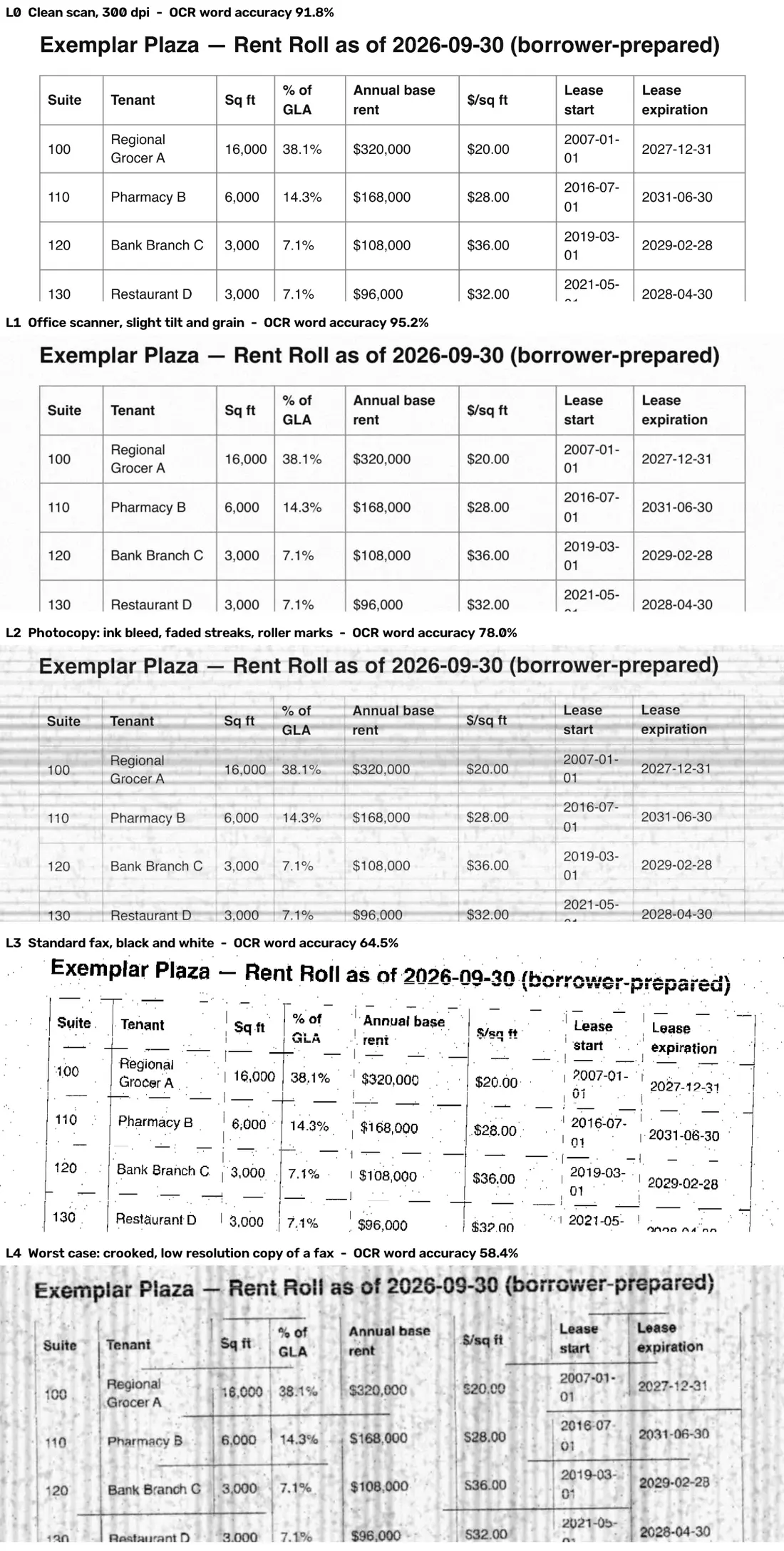
Five documents (credit memo, rent roll, operating statement, appraisal, personal financial statement) with 26 key numbers, damaged with the open-source Augraphy library: clean scan, office scanner, photocopy, standard fax, and a crooked low-resolution copy of a fax.
Eight real-world problems
Handwritten amounts, real people’s handwritten digits, numbers crossed out and rewritten by hand, stamps and signatures on top of numbers, phone photos, sideways pages, Spanish documents ($1.300.000,00), and PDFs whose hidden text layer is wrong.
Real handwriting in the wild
172 photographed handwritten pages from GoodNotes’ GNHK dataset: 616 handwritten numbers, from dates to amounts.
Planted mistakes
For every real number we planted wrong versions: a changed digit, a dropped digit (wrong scale), a moved decimal point, the wrong page, the wrong document, and a different number from the same line. A wrong number marked confirmed is a failure.
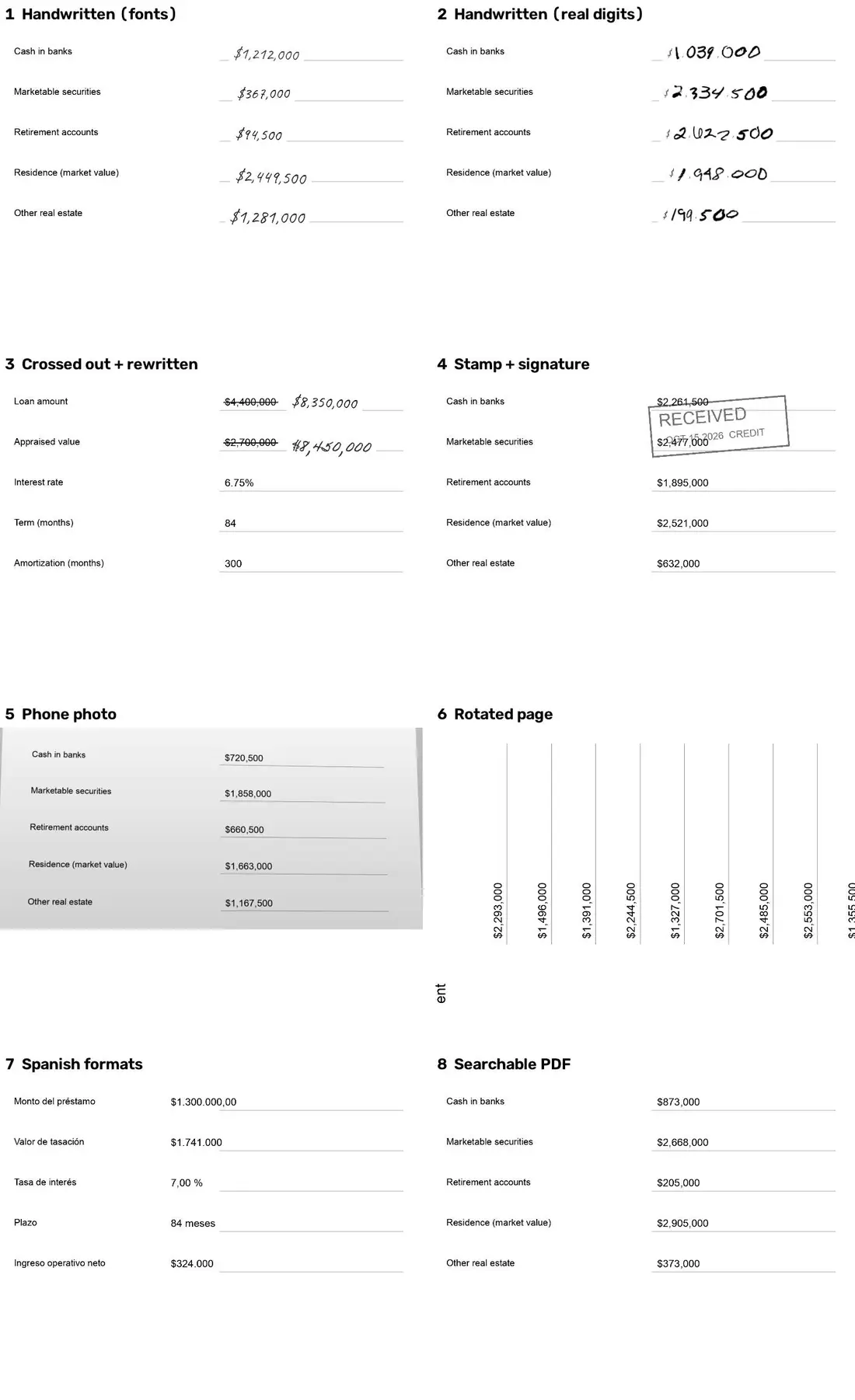
Pass standard: zero wrong numbers confirmed, on every kind of page, for every engine. Real numbers that don’t pass aren’t failures. They go to a person, which is the safe way to fail.
Results Same pages, four engines
Two scores for each engine. Read exactly: how often the engine printed the number exactly as it is on the page. Confirmed: how often the checker passed it automatically. Confirmed is lower because the checker’s rules send risky lines to a person even when the engine read them right.
Confirmed automatically
| Page type | Tesseract | Apple Vision | PaddleOCR | Azure |
|---|---|---|---|---|
| Clean scan26 numbers | 69% | 12% | 69% | 69% |
| Office scanner26 numbers | 62% | 27% | 65% | 69% |
| Photocopy26 numbers | 38% | 27% | 50% | 54% |
| Standard fax26 numbers | 4% | 15% | 42% | 38% |
| Worst-case fax copy26 numbers | 0% | 8% | 38% | 38% |
| Handwritten amounts54 numbers | 9% | 13% | 63% | 94% |
| Real handwritten digits54 numbers | 0% | 0% | 22% | 61% |
| Crossed out and rewritten36 numbers | 50% | 31% | 53% | 53% |
| Stamps and signatures54 numbers | 69% | 52% | 81% | 76% |
| Phone photos54 numbers | 13% | 15% | 74% | 83% |
| Sideways and upside-down pages54 numbers | 100% | 100% | 100% | 100% |
| Spanish documents48 numbers | 62% | 69% | 88% | 88% |
| Printed form, image read only54 numbers | 96% | 100% | 100% | 100% |
| Real handwritten pages (GNHK)616 numbers | 0% | 12% | 17% | 10% |
| All pages1,154 numbers | 22% | 25% | 41% | 41% |
| Wrong numbers confirmed | 0 / 3,714 | 0 / 3,714 | 0 / 3,714 | 0 / 3,714 |
Read exactly
| Page type | Tesseract | Apple Vision | PaddleOCR | Azure |
|---|---|---|---|---|
| Clean scan26 numbers | 100% | 96% | 100% | 100% |
| Office scanner26 numbers | 96% | 100% | 96% | 100% |
| Photocopy26 numbers | 77% | 92% | 100% | 100% |
| Standard fax26 numbers | 50% | 88% | 81% | 100% |
| Worst-case fax copy26 numbers | 42% | 92% | 100% | 96% |
| Handwritten amounts54 numbers | 33% | 87% | 89% | 100% |
| Real handwritten digits54 numbers | 2% | 72% | 81% | 93% |
| Crossed out and rewritten36 numbers | 75% | 83% | 86% | 100% |
| Stamps and signatures54 numbers | 74% | 80% | 89% | 96% |
| Phone photos54 numbers | 37% | 85% | 93% | 100% |
| Sideways and upside-down pages54 numbers | 100% | 100% | 100% | 100% |
| Spanish documents48 numbers | 100% | 100% | 100% | 100% |
| Printed form, image read only54 numbers | 98% | 100% | 100% | 100% |
| Real handwritten pages (GNHK)616 numbers | 10% | 60% | 62% | 76% |
| All pages1,154 numbers | 36% | 74% | 76% | 86% |
- Azure reads the most numbers exactly (86% overall, 76% on real handwriting). It confirms fewer handwritten numbers than PaddleOCR because the checker’s rules hold back low-confidence handwriting, which in practice goes to a person anyway.
- Apple Vision’s confirmed score is held down by our test setup, not its reading. It returns whole lines instead of single words, and our adapter that splits them throws off the checker’s line matching. Its read-exactly scores (96–100% on clean scans) are the fair measure of its reading.
- Tesseract is the weakest reader on damaged pages, but on clean scans it confirms as much as the others.
Rotated pages were read with each engine’s orientation step turned on. Apple Vision runs only on Apple devices; we include it as a reference, not as a server option. Azure ran on the free F0 tier of Azure AI Document Intelligence (prebuilt-read model). PaddleOCR 3.7 (PP-OCRv6) and Tesseract 5.5 ran on a MacBook (M1 Pro).
The rules What keeps a wrong number from slipping through
These rules did more for safety than any engine. Most of them exist because a test found a way around the one before.
- Two independent reads must agree
The number the AI used and the number the OCR engine read at the same spot on the same page must match.
- Whole numbers, decimal point included
$600,000 doesn’t match $6,000,000, and 1.25x doesn’t match 12.5x, even though the digits overlap.
- A line with several numbers goes to a person
A table row or “5 years / 30 years” proves the number is on the line, not that it’s the right column.
- A repeated label goes to a person
If “NOI 2024” and “NOI 2025” both appear, the checker can’t know which one was meant.
- Crossed-out numbers go to a person
The checker looks for a stroke through the number on the page image, including sloped hand-drawn strikes.
- A PDF’s hidden text is never trusted alone
A scanner’s text layer is a guess. It’s always checked against an independent read of the image.
- Letters stuck to a number don’t count
“30 days” read as “3odaus” is not a 3. Units like 1.25x or 6.75% are fine.
Our policy on handwriting: send every handwritten number to a person, even when an engine reads it perfectly, and use the engine to pre-fill it so the person only confirms. The checker can’t tell handwriting from print yet, so this is a workflow rule, not a check.
What the checker does not prove: that the number is the right one for the question. It proves where the number is printed. Choosing the right line is still the AI’s job, and a person reviews anything the rules flag.
What broke Nine weak spots the tests found in our own checker
This is why you test by trying to break things. Every one of these is fixed, and each has a test that keeps it fixed.
- A dropped digit passed
The first version accepted a number if its digits appeared anywhere on the line, so $600,000 passed against $6,000,000. On the clean scan, 18 of 92 planted mistakes got through.
- The wrong column passed
A real number from the same table row passed as the answer. Fixed with the several-numbers rule.
- A moved decimal point would have passed
1.25x and 12.5x have the same digits. Numbers are now compared with the separator in place.
- Crossed-out numbers passed
A printed figure with a line through it could pass as the current one.
- Sloped strikes slipped past one engine
A hand-drawn strike isn’t perfectly flat, and one engine gave rough word boxes. Fixed by looking through a thin band.
- Hidden PDF text let wrong numbers through
Checking against a scanner’s text layer alone confirmed every wrong number that came from that layer, including a white-text “pre-approved $5,000,000” line. Checked against the page image, all were caught.
- Letters fused into numbers
An engine read “30 days” as “3odaus”, and the checker saw a 3.
- The same label on two lines
“1 year” and “2 years” on one page let the wrong line’s number pass.
- Part of a spaced-out number
An engine read a handwritten “345” as “3 4 5”, and a planted “34” matched the first two pieces.
Which one to use Pick by what your documents look like
| If your documents are | Use | Why |
|---|---|---|
| Mostly original digital PDFs | No OCR needed for confirmation | The text in a digital PDF is the document itself. Confirm against it directly; send only scanned pages to an engine. |
| Mostly clean office scans | Tesseract (free) is enough | About as good as the others on clean scans, tiny, runs anywhere. |
| Faxes, photocopies, phone photos | PaddleOCR (free) or Azure | Both confirm many times more than Tesseract on bad pages. PaddleOCR is free but you host it; Azure is managed. |
| Lots of handwriting | Azure | It read handwriting most accurately. Still send handwritten numbers to a person. |
| You already pay for Microsoft Azure | Azure | Pennies per file, nothing to host, and your IT may have approved it already. |
Keep a free backup. If your main engine is ever down, run Tesseract. Nothing gets confirmed unsafely; more numbers just go to a person.
What it means for the people checking
A rough estimate for a file with 60 numbers that matter, assuming 2 seconds to glance at a green one, 15 seconds to confirm a flagged one, and a minute to find and type a missing one.
| Kind of file | Tesseract | PaddleOCR | Checking every number by hand |
|---|---|---|---|
| Clean scans | about 6 min | about 6 min | about 60 min |
| Faxes | about 40 min | about 20 min | about 60 min |
| Phone photos | about 43 min | about 14 min | about 60 min |
| Handwritten forms | about 45 min | about 28 min | about 60 min |
Estimates from the test pages, not timed with real users.
Cost What each engine costs
| Tesseract | Free, open source (Apache 2.0) | Runs on any computer or server. Smallest and easiest to install. |
|---|---|---|
| PaddleOCR | Free, open source (Apache 2.0) | Needs its own Python environment and a ~100 MB model download. A few seconds a page on a laptop, under a second with a graphics card. |
| Azure AI Document Intelligence | About $1.50 per 1,000 pages (Read model) | Free tier: 500 pages a month. A 100-page file costs about 15 cents. Runs in your own Azure account. |
| Apple Vision | Free, built into macOS and iOS | Only on Apple devices, so not an option for most servers. |
Azure list prices as published by third-party trackers in 2026; check the Azure pricing page before you buy. The bigger cost of a cloud engine is usually approval: your security team has to accept sending pages to it.
Questions people ask
Is Tesseract good enough for OCR?
On clean office scans, yes: in our test it confirmed about as many numbers as PaddleOCR and Azure. On faxes, photocopies, phone photos and handwriting it falls far behind, so more numbers end up with a person. It’s free, tiny and runs anywhere, which makes it a good backup.
Tesseract vs PaddleOCR: which is better?
PaddleOCR. On the same pages it confirmed many times more numbers on faxes (42% vs 4%) and phone photos (74% vs 13%), and about the same on clean scans. Both are free and open source (Apache 2.0); PaddleOCR is heavier to install and slower without a graphics card.
Which OCR is best for handwriting?
In our test, Microsoft Azure AI Document Intelligence read handwriting most accurately. Even so, we recommend sending every handwritten number to a person and using the OCR only to pre-fill it.
How do you validate OCR output?
Don’t trust the engine’s own confidence score alone. Compare it with an independent read (for example, the number an AI extracted), require whole-number matches including the decimal point, and send anything ambiguous to a person: lines with several numbers, repeated labels, crossed-out or handwritten figures. Then test it by planting wrong numbers and counting how many get through.
Can you trust an OCR confidence score?
Not by itself. Confidence scores differ between engines and an engine can be confident and wrong. Use confidence as one condition among several, never as the only one.
How much does Azure Document Intelligence cost?
The Read model lists at about $1.50 per 1,000 pages, with 500 free pages a month on the free tier. A 100-page file costs roughly 15 cents. Check Azure’s pricing page for current prices.
Do I need OCR for PDFs?
Not if they’re original digital PDFs: the text stored in the file is the document itself, so numbers can be confirmed against it directly. Scanned PDFs need OCR, and their hidden text layer should never be trusted alone, because it’s a scanner’s guess.
Should an AI check its own reading?
No. It would repeat its own mistakes. The confirming read should come from a separate system, such as an OCR engine, and anything uncertain should go to a person.
What’s next More engines, and the digital-PDF path
We’ll add Google Document AI, Amazon Textract, docTR and Mistral OCR to the same test, and measure the digital-PDF path, where most numbers can be confirmed against the file’s own text with no OCR at all. If you’d like a specific engine tested, tell me.
Limits of this test
- The documents are fictional or from public datasets. Real files will differ; test on your own before relying on any engine.
- “Confirmed” depends on our checker’s rules, which are deliberately strict. A looser checker would confirm more and catch less.
- The workload minutes are estimates, not timed studies.
- Each engine ran with default settings. Tuning could change the results.
- In a separate check on 100 photographed receipts (CORD), 1 of 830 planted wrong numbers got through: a “0% 0” tax line, where dropping a digit still left the value at 0.
Credits Data and tools
- Real handwriting: GNHK (GoodNotes Handwriting Kollection), © GoodNotes, CC BY 4.0. GoodNotes no longer hosts it; we used the test split from a Hugging Face copy with the original files and labels.
- Receipts used in an earlier check: CORD v2 by NAVER Clova, CC BY 4.0.
- Handwritten digits: MNIST, CC BY-SA 3.0. The “real handwritten digits” image on this page is built from MNIST digits and is shared under the same license.
- Handwriting fonts from Google Fonts (Caveat, Kalam, Patrick Hand, Reenie Beanie, Nanum Pen: SIL Open Font License; Homemade Apple: Apache 2.0).
- Scan damage: Augraphy (MIT). Engines: Tesseract (Apache 2.0), PaddleOCR (Apache 2.0), Apple Vision, and Microsoft Azure AI Document Intelligence.